
A product of DKG Technologies.

Keep the trading day connected.

TranXact brings the work surrounding a trade into a clearer operational view—from readiness and exceptions to settlement priorities, ownership and supporting evidence.

The operating day

The trade moves. Its context needs to move with it.

Every handoff changes who needs to act. The trade, its evidence and its outstanding questions need to stay connected.

Follow five tasks across the operating day, using the demonstrated trade, portfolio and account views below.

TranXact demonstration environment · Screens show synthetic data and simulated integrations.

01 / The operating day

Start with the state of the work.

Before a handoff, front-office and operations teams need to know what is ready and what is blocked. The portfolio-readiness view brings that work together.

  • Check operating books and funds against linked accounts and counterparties.
  • Find outstanding instructions and readiness requirements.
  • Carry each blocker and its owner into the handoff.

A handoff with the requirement, affected work and responsible person attached.
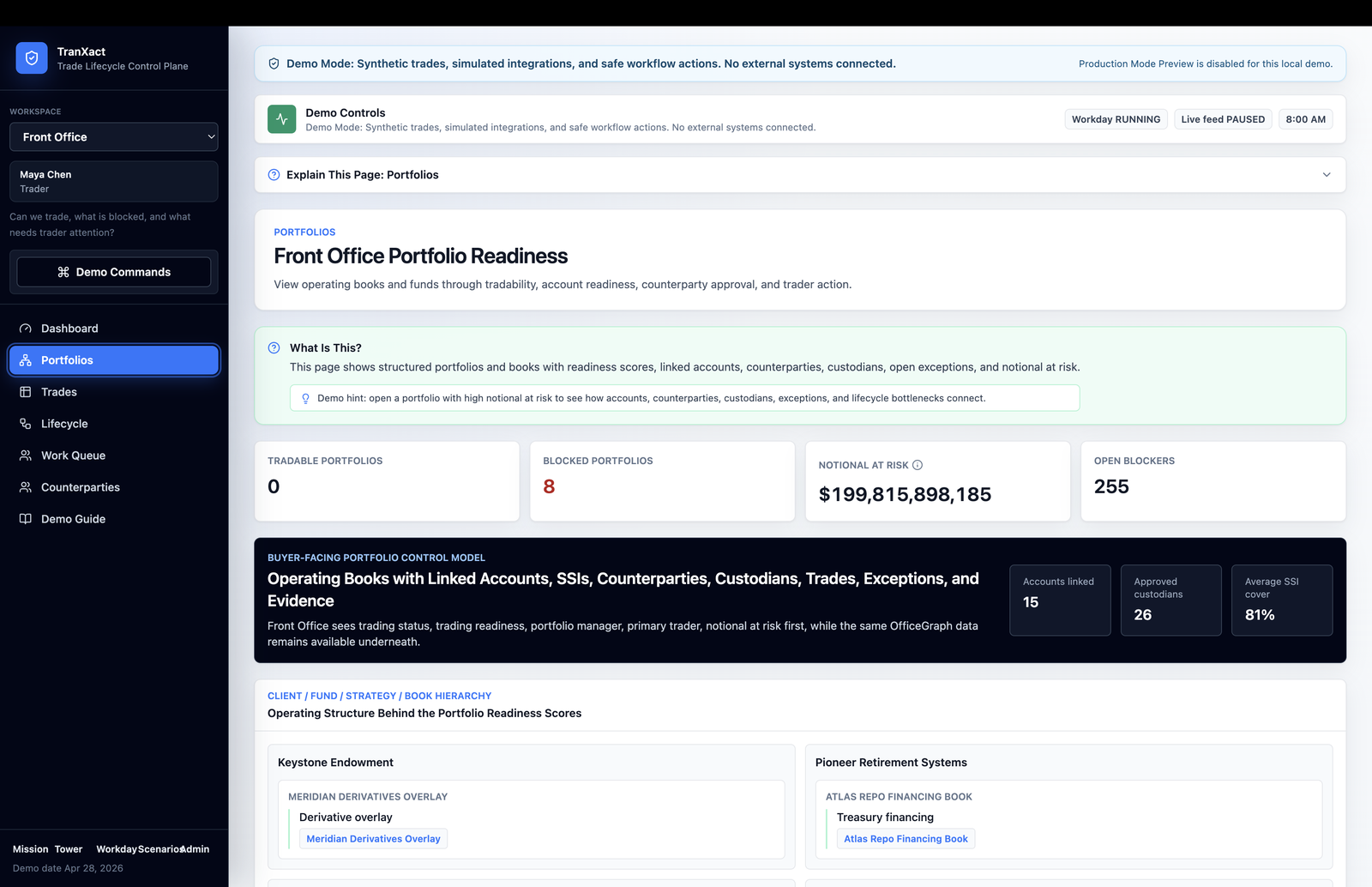
TranXact Front Office Portfolio Readiness screen showing demo portfolio readiness summaries and a client, fund, strategy and book hierarchy.
Front Office Portfolio Readiness

Operating books and funds viewed through trading readiness, linked accounts, counterparties and outstanding blockers.
TranXact

Front Office Portfolio Readiness

02 / The operating day

Give exceptions context and ownership.

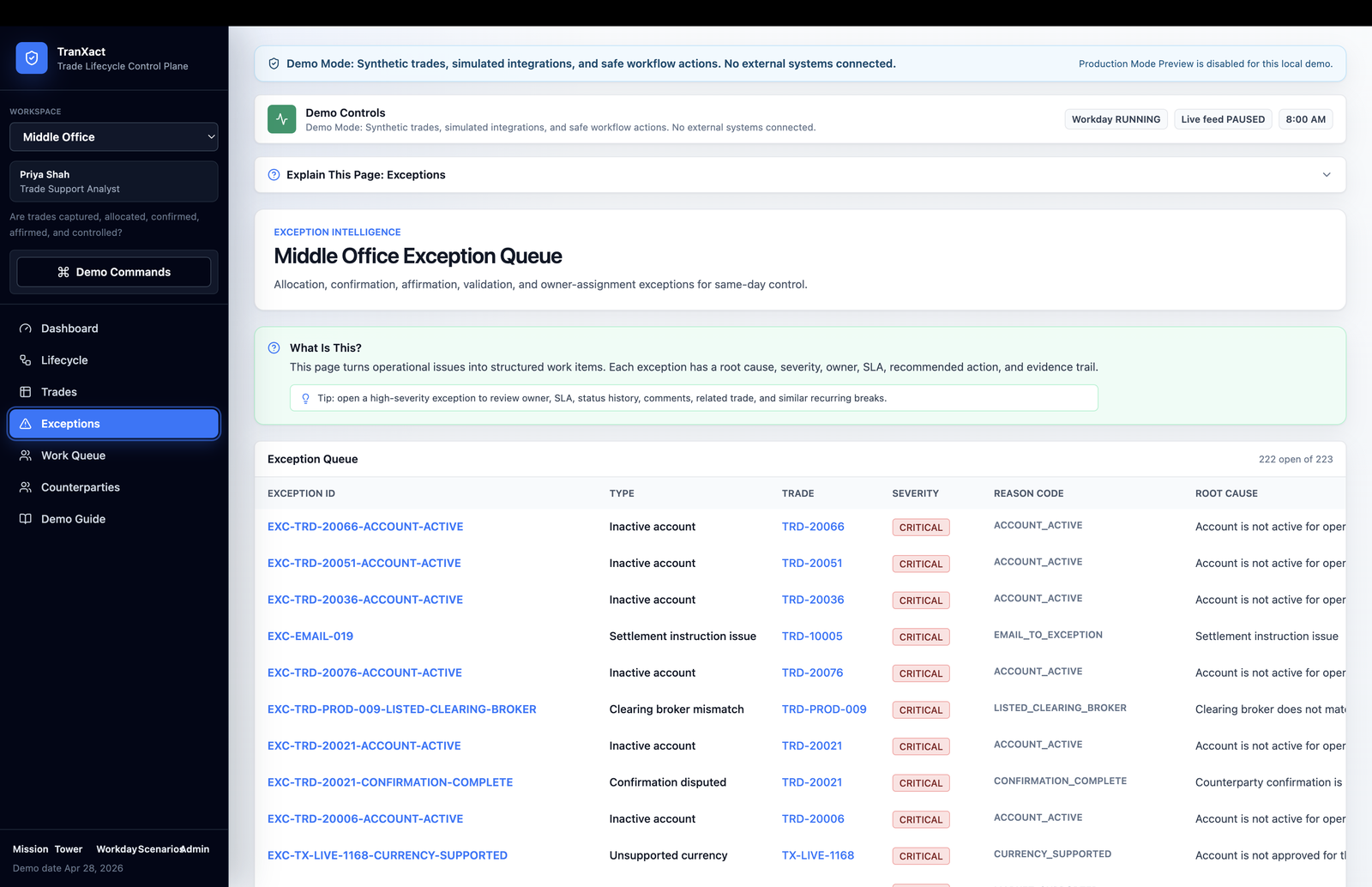
The demonstrated exception queue puts a reconciliation issue beside the trade and evidence needed to investigate it.

  • Inspect severity, reason codes and root-cause information.
  • Follow the linked trade to understand what happened.
  • Identify the responsible owner and agree the next action.

An unresolved question that someone can investigate and act on.

TranXact Middle Office Exception Queue with a demo-mode banner and a table of exception identifiers, linked trades, severity and reason codes.
Middle Office Exception Queue

An exception queue with linked trades, severity, reason codes and root-cause information.

TranXact

Middle Office Exception Queue

03 / The operating day

Bring settlement priorities into view.

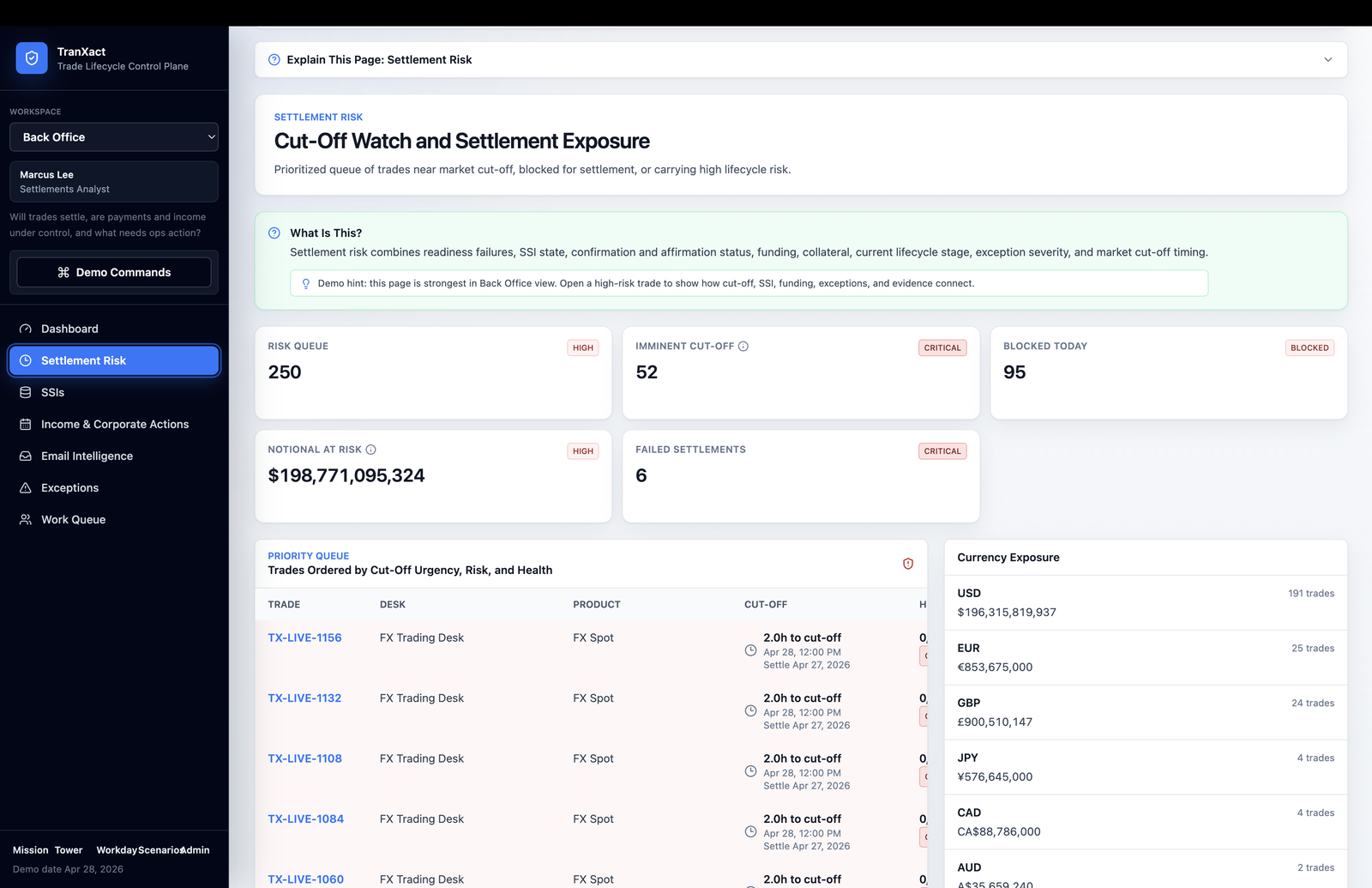
Near a market cut-off, back-office teams need to see which dependencies could delay settlement. The preview brings the cut-off queue and currency exposure into view.

  • Check instructions and confirmations for missing or stale information.
  • Examine funding dependencies and unresolved lifecycle work.
  • Prioritise affected trades against the relevant deadline.

A settlement priority with a clear deadline and follow-through.

TranXact Cut-Off Watch and Settlement Exposure screen with a prioritised demo trade queue and currency exposure panel.
Cut-Off Watch and Settlement Exposure

Settlement priorities organised by cut-off urgency, risk and trade status, alongside currency exposure.

TranXact

Cut-Off Watch and Settlement Exposure

Continue the work

Settlement is part of a wider responsibility.

Servicing, follow-through and oversight depend on the information carried forward from the trade.

04 / The operating day

Keep the related work visible.

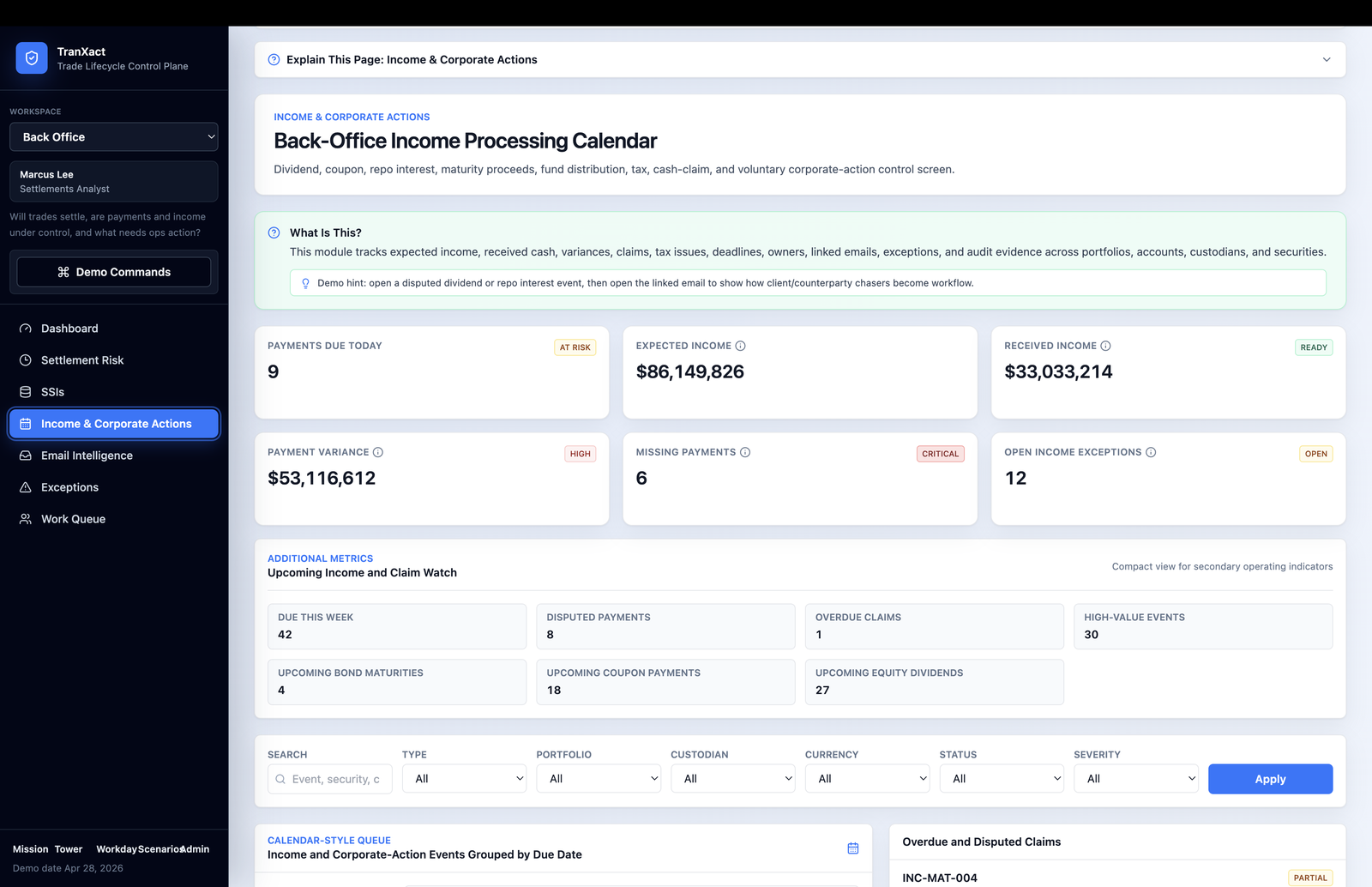
Income and corporate-action events create follow-up work after the trade. The income-processing calendar connects those events to portfolios and accounts.

  • Compare expected income with received cash.
  • Investigate variances, claims and payment differences.
  • Keep supporting information beside the servicing item.

A clear distinction between an expected event and an item needing attention.

TranXact Back-Office Income Processing Calendar showing demo income summaries, upcoming events, filters and a calendar-style queue.
Back-Office Income Processing Calendar

Income and corporate-action work, including expected and received income, payment variances, claims and upcoming events.

TranXact

Back-Office Income Processing Calendar

05 / The operating day

Support the people overseeing the process.

Operations, management, compliance and technology teams need different views of outstanding work. Role-specific summaries and daily queues provide a starting point for review.

  • Follow trade references and supporting evidence.
  • Identify where review, ownership or approval is needed.
  • Establish the approval steps, permissions and reporting outputs during evaluation.

Shared evidence, with responsibilities defined for the organisation.

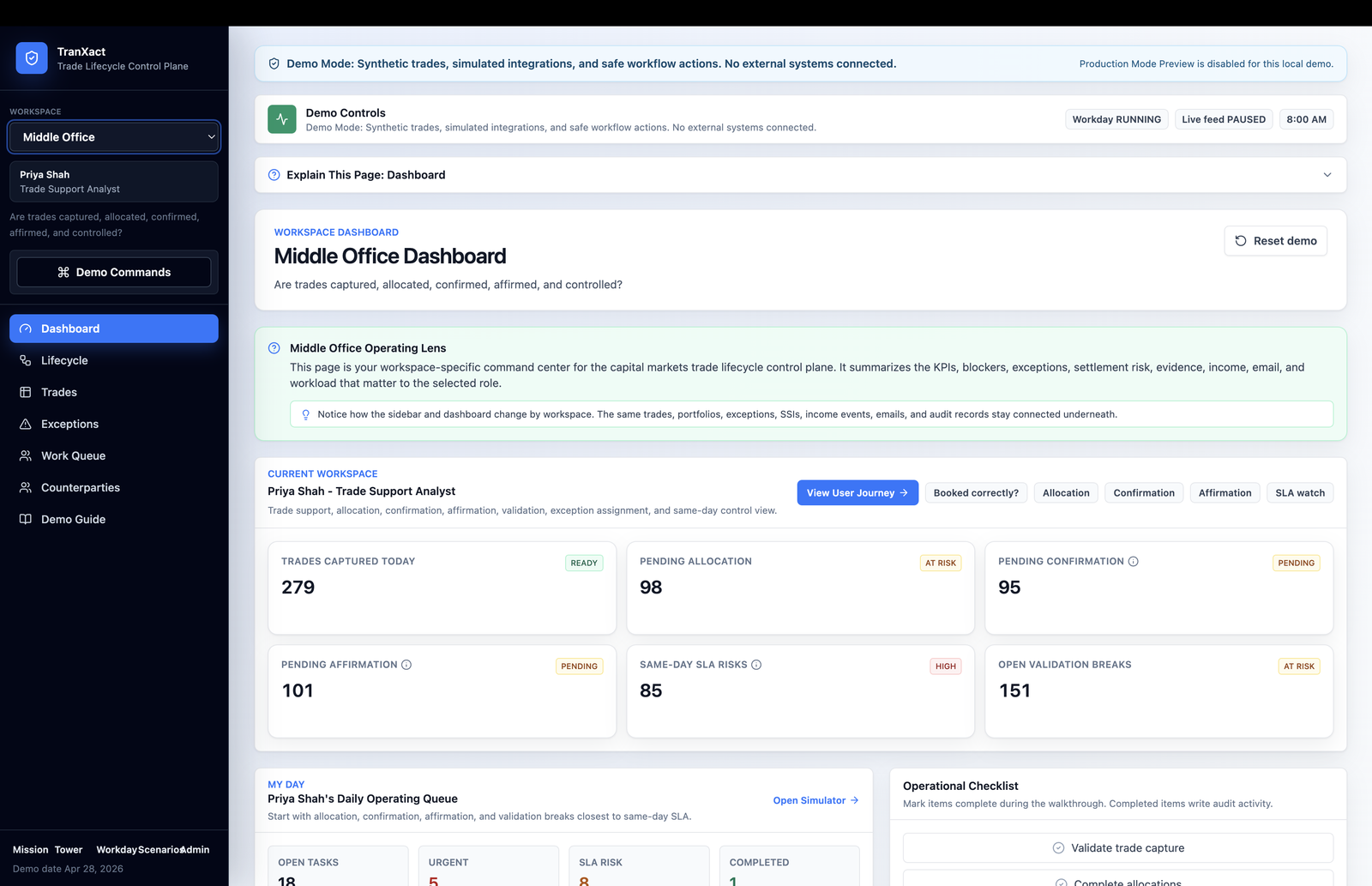
TranXact Middle Office Dashboard with a demo-mode banner, role-specific priorities and operational status summaries.
Middle Office Dashboard

Trade capture, allocation, confirmation, affirmation and validation priorities in the middle office workspace.

TranXact

Middle Office Dashboard

Who it is for

Different responsibilities. A shared operational picture.

Front, middle and back office

People following trade readiness, investigating exceptions, managing handoffs and working through settlement or servicing priorities.

Review and management

People who need to understand outstanding work, review the evidence behind an item and make responsibilities clear.

Technology and operations change

Teams examining information flows, current systems and the requirements of a more connected operating process.

Exploring the fit

Start with one workflow worth improving.

A useful evaluation begins with a defined piece of work and the people responsible for it.

Discuss TranXact
  1. Describe the current process.

    Choose a workflow and identify its handoffs, constraints and recurring questions.

  2. Bring representative inputs.

    Discuss the trade information, documents and operational context the team needs to inspect. Agree how any evaluation material should be handled.

  3. Define a useful outcome.

    Identify the output, decision or next action to review, and the people who should assess whether the workflow is clearer.

The next conversation

Which part of the trading day needs a clearer view?

Start with a workflow, the teams involved and the questions that are difficult to follow today.